
Overview
To locate the Failed orders report, go to Reports > Economy > Failed orders
An order is marked as Failed when the payment cannot be completed. This may happen if the due date has passed, the maximum number of charge attempts has been reached, or the customer does not have a valid payment method.
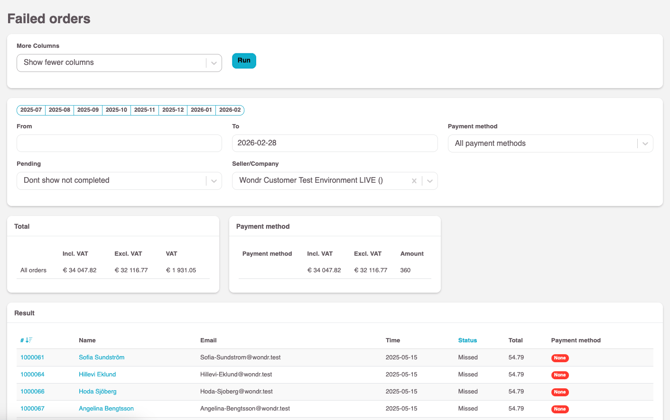
The Failed Payments report is typically the starting point when following up on unpaid orders.
You can perform the following actions for this report:
-
Export and downloadthe current results as Excel (.xls) or comma-separated values (.csv) Send a mailingto all Users attached to failed orders shown in your results
💡 Quick-actions for your reports are located in the top-right corner.
Searching & Filtering
More columns
Toggle between showing fewer or more columns in the results list. When enabled, the following additional information is displayed about the User attached to the failed order: email address, phone number, personal number / date of birth, address, ZIP code, and city.
This is useful if you need to present a more detailed report on your users with outstanding payments.
Filters
Available filters to use to adjust which failed orders are returned in your results.
💡 When downloading the report or emailing customers, only the orders currently shown in the results are included.
| Field | Description |
| From | Search start date |
| To | Search end date |
| Payment method |
Choose to see only a specific payment method. Default: All payment methods |
| Pending |
By default, not completed orders are excluded. These are orders where the checkout was started but not completed, for example if the customer cancelled or aborted the purchase. Select Show not completed to include them in the results. |
| Seller/Company |
If you have more than one payment processor added to Wondr, you can choose which one you want to filter sales for here. If you only have one, you don't need to choose anything here. |
| Facility |
If you have multiple facilities, you can filter on a specific one or all of them. |
Summary
Total
Summary of the orders in the results, showing totals excluding VAT, including VAT, and the total VAT amount.
Payment method
Summary of the orders in the results, grouped by payment method.
Results
The results table lists each order with a failed payment as a row. The columns displayed depend on whether the Show more columns option is enabled.
| Field | Show more enabled | Description |
| # | Order number (ID) | |
| Name | Name of attached Customer | |
| E-mail of attached Customer | ||
| Mobile | Yes | Phone number of attached Customer |
| Person number / birth date | Yes | Person number / birth date of attached Customer |
| Address | Yes | Address of the attached Customer |
| ZIP code | Yes | ZIP code of the attached Customer |
| City | Yes | City of the attached Customer |
| Time | Payment date for the Order | |
| Status | Payment status for the Order | |
| Total | The total amount for the Order | |
| Payment method | The payment method for the Order |
📚 For more information about how failed payments should be handled based on the payment method used, read the article Failed payments .
Last edited: 4/5-2025