
Introduction
My Results is a simple feature where your members can manually record their training results. All results that can be registered need to be created by you or another admin first.
Configuration: Enabling "My Results" for Members
The visibility of the My Results feature is controlled at the facility level. When activated, the button will automatically appear on the member's Dashboard.
How to manage visibility
To enable or disable this feature for specific locations:
-
Navigate to
Settings > My Results -
To disable for all facilities: Check the box labeled "Hide Wondr-wall my result button".
-
To filter by facility: Use the Facility dropdown menu to select which specific facilities this setting should apply to.
-
Click Save.
Create an exercise
To create the exercises that members can record their progress for, do this:
-
Go to
Settings > My Results -
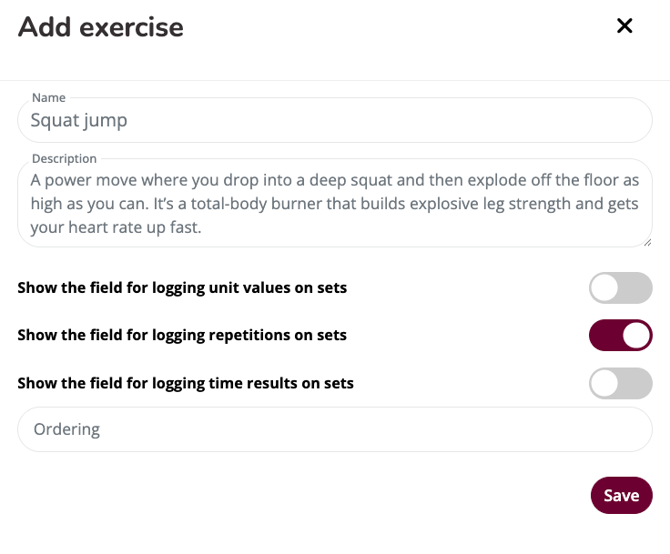
Click on the plus sign in the top right corner to create a new exercise.
-
Enter values based on the type of exercise to be posted.
-
Click save
Values:
Name: The name of the exercise, e.g. running, squats, dead lifts, box jumps, etc.
Description: Describe the exercise
Show the field for logging unit values on sets: If you wish a specific unit value for the exercise like for example kg if it's a weight specifik exercise activate this function and write the desired unit value.
Show the field for logging repetitions on sets: Activate this function if this is a set based exercise and members should be able to register sets. If this is not active only one result can be registered at a time.
Show the field for logging time results on sets: Activate this function if the exercise is time oriented.
Sorting/ordering: Enter a number to control the order in which the exercises are visible to members. 0 is displayed first, then 1, then 2, etc.
Want to see what it will look like? You can see the full list of exercises via Dashboard > My Results. Click the button to see what it will look like for members.
Member Guide: Tracking Training Results
Once you have created all the exercises, members can now start recording their training results.
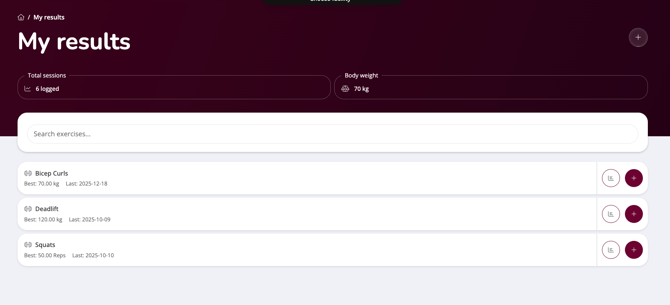
They do this on Dashboard via the "My results" button.
Adding Exercises
Before a member can record results, they must select the exercises they wish to track from the library you have configured in the system.
-
Navigate to the Dashboard.
-
Click the My Results button.
-
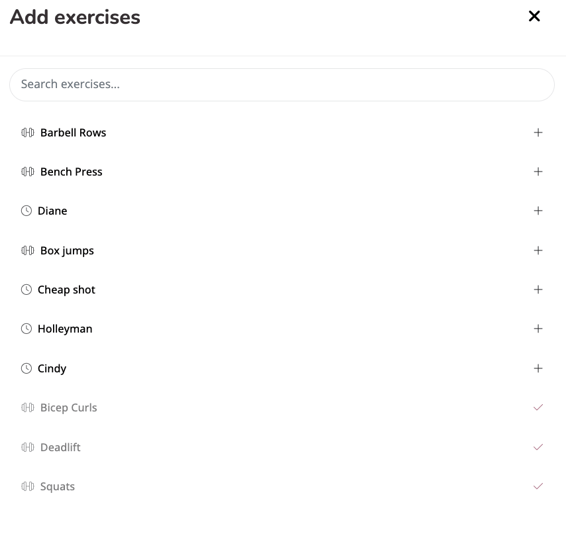
Click the (+) Plus icon in the top-right corner to open the exercise library.
-
Browse the list of available exercises:
-
Available: Exercises not yet tracked will display a (+) Plus icon.
-
Added: Exercises already on the member's list will be slightly greyed out and display a Checkmark.
-
-
Click the (+) Plus icon next to an exercise to add it to the personal tracking list.
Recording Training Results
-
Click on
My resultsonDashboard -
Select the specific Exercise from the list.
-
Click the (+) Plus icon to create a new entry.
-
Enter the following data in the pop-up modal:
-
Result (e.g., distance or time, depending on exercise type)
-
Date
-
Reps
-
Weight
-
Comment (Optional free-text field for notes)
-
Viewing Progress and History
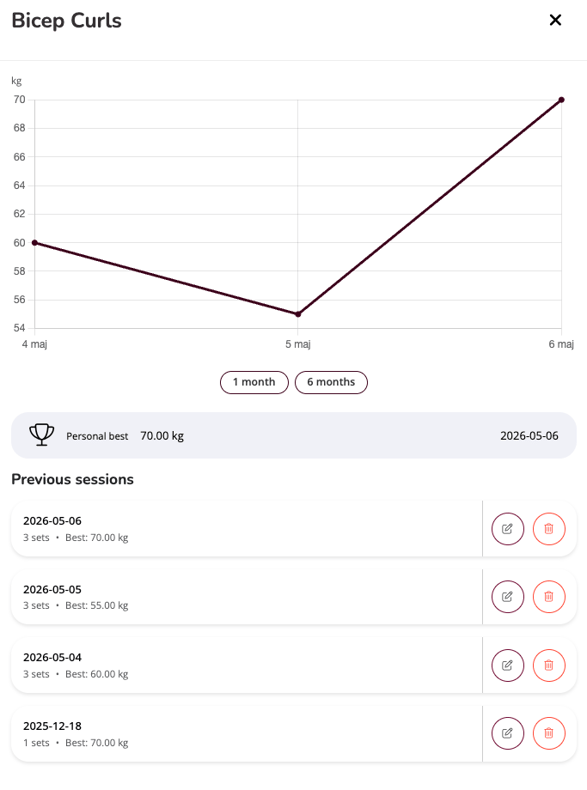
By clicking the Graph Icon on the left side of the exercise entry, members can view a visual representation of their progress over time.
-
History & Personal Bests: Members can view a chronological log of all past entries and their all-time records.
Last edited: 6/5-2026