
Intro
In this article, we describe step-by-step how to create a smart rule that blocks customers as soon as they have a failed payment in Wondr.
NOTE: If you also want customers to be unblocked when they have paid, you need to have another rule that unblocks.
See the article
Do this:
Go to Settings > Smart Rules.
Click the plus icon in the top right to add a new smart rule.
Select trigger
The first step is to choose what type of event in the system will trigger the rule. Select the option "All users, once per day".
Now it's time to set up the smart rule.
Start by filling in "Name", in this example we have chosen to name the rule "Block on missed payment". Below there is a checkbox "Enable" to activate the rule, check it and the rule will take effect when it is saved.
During filtering, first press the "Add comparison" button.
In the first drop-down list, select "User - Earliest payment not paid".
In the second drop-down list, select "More than days backwards".
In the third drop-down list, type "15".
(In the top drop-down list where you choose between "and" or "or", leave "and" as is).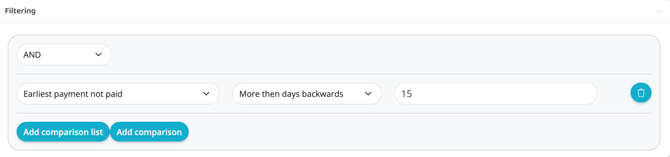
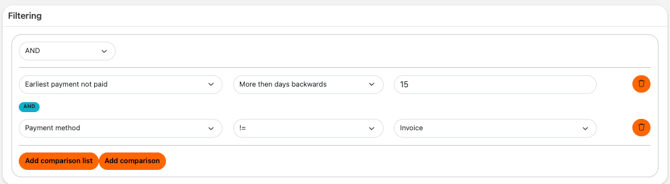
There is also the option to add Invoice, so no block goes to invoice customers.
Defauly payment method -> payment method.
!=
Invoice
Add action
Add a first action via the plus sign.
Select "Warnings & blocking - Block User"
Reason for blocking - Missed payment
Add a second action via the plus sign.
Select Communicate - Email . For this action, there are a few more options, set as below:
From
The facility's email address.
To
$(User.email)
Use Layout
DO NOT check this box.
Subject
Optional! This will be the subject line of the email (e.g. "You have missed a payment and have been blocked").
Content
Here you fill in what you want to be in the email that goes out to members.
Example
"Hello $(User.first_name),
Because you have made one or more failed payments with us, your subscription has been blocked. We ask that you pay your failed payments as soon as possible so that you can once again use your subscription with us.
NOTE: Future monthly payments will not be stopped.
The hold will be lifted the day after you have paid the full amount.
If you have any questions, please contact the reception staff.
Have a good day,
Kind regards, XXX"
Then set Repeats
Number of days until this rule can be run again
30
Subject
User
Press "Create".
IMPORTANT
If you have chosen to check the box "Enabled", the rule is now live, keep in mind that it may be a good idea to notify your customers before such a rule is put into use. If you have any questions, contact our support.
Last edited: 1/7-2025