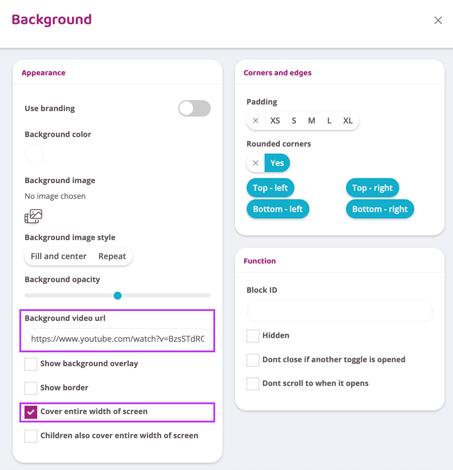
A video link from Youtube or Vimeo can be embedded in a background block so the video automatically plays in the background without sound. This is often used at the top of a website but can of course be placed anywhere on a page. Follow the guide below to create a background block with embedded video.
Add a background block- Check the box "
Cover the entire width of the screen" - Paste the Youtube or Vimeo link in the "
Link to background video" box - Fill the background block with content such as separators, title, and text that will be on top of the video playing in the background.
Keep in mind that the video needs to be in landscape format to cover a full-width screen, so portrait videos from e.g. Instagram cannot be used here.
The first time the video is uploaded, an error message may appear on the screen stating that it is not working. This is often resolved by saving the page and reloading. If it still does not work, make sure that the video is public and not private in YouTube's settings and that it has not been uploaded via YouTube shorts.
See the video below for an example of how to create a background block with embedded video at the top of the page. Most often there is no background block at the top of a website when you have an effect that the text "rolls" over the background image. So then you need to create a background block with the above settings and move the content there. This is shown in the video below. If you don't have this setting already, just follow the guide.
If you do not see the option "Cover entire width of screen" in the background block it has been places inside another background. The background block needs to be isolated/not in another block in order for the setting to appear.