
-
Go to "Users" in the main menu.
-
Find the person to be frozen in the list by filling in the name in the Search field and then click the eye to go to the profile page.
-
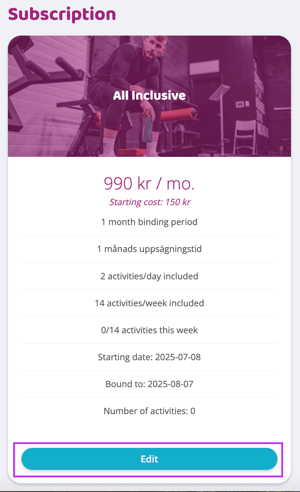
Scroll down on the page to the section related to subscription. Press "Edit" on the correct subscription.
-
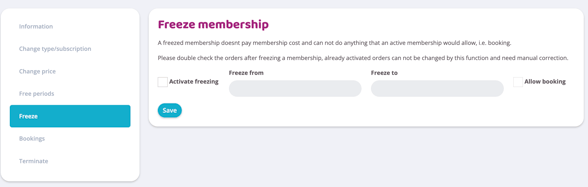
Press the Freeze button.
Check the Enable freeze box and then fill in the dates in the Freeze from and Freeze to fields. It is possible to enter a date in the middle of a month, the system will deduct the cost for the number of frozen days from the upcoming payment.
If the subscription is frozen for entire months, the entire amount will be reset via a credit order.
For example, if frozen for 1 full month and 2 days, the orders will look like this:
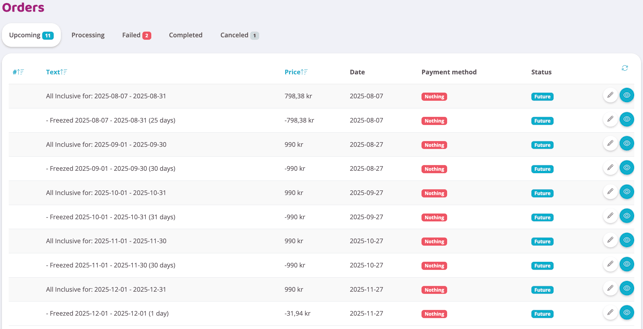
There will always be a regular and a minus order for the months affected by the freeze, but only one amount will be deducted for the user. Always double-check the orders after a freeze. An already activated order cannot be reset by this function and therefore needs to be corrected manually.
If the customer should be able to book activities during the freeze period, click in the "Allow booking" box to the right of the Freeze from and Freeze to fields.
It is also possible to automatically extend the binding period and the end date in connection with a freeze.
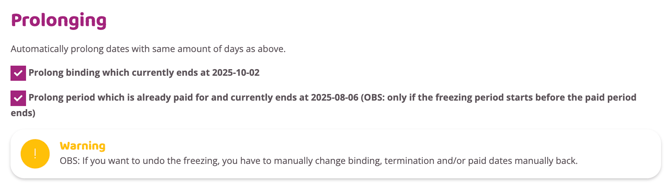
In order for the binding time to be extended in connection with the freeze, the top checkbox "Extend the binding time that is currently starting... " must be checked.
To extend the end date, leave the lower checkbox "Prolong binding which currently ends at..." checked. However, this only works if the freeze period is completely within the paid freeze period.
Undo/cancel a freeze period
To undo a freeze, click the Activate freeze box and then the freeze must be saved again. Orders that have not yet been activated will return to how they were before the freeze.
NOTE: If the binding time and/or closing date have been moved in connection with the freeze period, they must be corrected manually as they are not automatically reset. This also applies to already activated and executed orders.
Last updated: 7/8-2025