
Intro
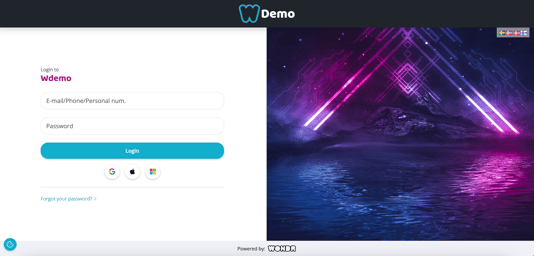
With SSO (single sign on) login, anyone with a user in Wondr can log in to their profile through external accounts on these platforms:
Google
Apple
Microsoft
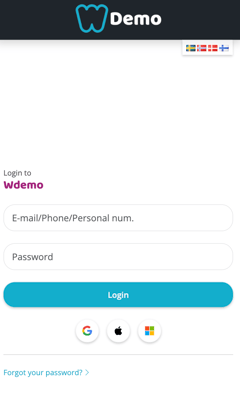
On the login screen in both the app and browser, there are three icons where you can choose which service you want to use to log in to Wondr.
Settings
This feature is automatically enabled in your Wondr. To control which login options are available, go to Settings > Customers and scroll down to Login methods.
There you uncheck the login options you do not want to use.
NOTE! Since the Wondr booking app does not know which facility a person belongs to until the information is filled in, all icons will always be visible regardless of whether some have been deactivated. However, there will be an error message if someone tries to use it to log in. In browsers that are connected directly to your unique Wondr domain, only the choices made for login will be visible.
Email/passwordTraditional login where email address and password are filled in-
Google
Login via Google account
Apple
Login via Apple account
MicrosoftLogin via Microsoft account
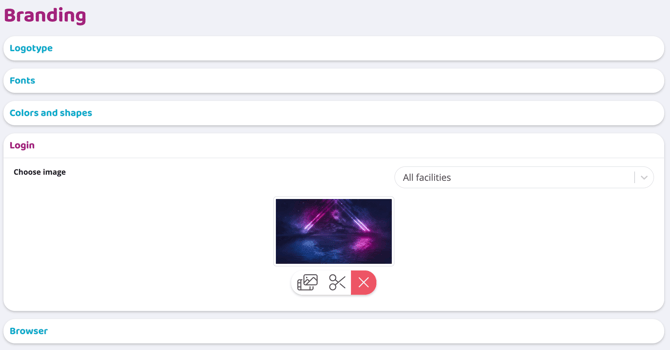
The login page image can be changed to something more personal to your facility. Go to Settings > Branding > Login to select/change image.
Questions & Answers
-
Can customers create a profile via SSO?
The icons for Google, Apple and Microsoft are present when a brand new customer creates a profile. These can then be used to automatically fill in the email address, first name and last name, but the remaining information still needs to be filled in manually.
-
Do the email address in Wondr and the service you use to log in have to be the same?
Yes, the email address registered in Wondr must be the same as the one you have connected via your SSO login account.
-
What happens if you try to log in with an external account that has a different email address than the Wondr profile?
No new account is created, but the user receives an error message that the information is incorrect.
-
Is the Wondr profile locked to login via, for example, Apple if it is selected the first time you log in?
No, Wondr does not store that information, so if a member wants to log in with Google one day and Apple the next, it works great.
-
Can I turn off the traditional login with email and password and only use SSO login?
Yes, you can. Then remove
Email/passwordunderCustomers > Settings. - Is it possible to change the picture on the login page?
Yes, go to
Settings > Branding > Loginto select/change image.
Last edited: 5/8-2025