
Table of contents:
1. Getting started
2. Charging period
3. Cost
4. Binding & termination
Getting started
- Create a new subscription by going to Settings>Customers>Subscription Types.
- Click the plus sign in the top right corner to create a new subscription.
- Enter correct information in boxes such as name, sales channels, home facility, subscription category, etc. These settings always look different depending on how you sell subscriptions. Read more about these settings in the article "Create a new subscription" or contact support if anything is unclear.
- Go to the "Period type" box. This specifies when during the month that orders should be created and activated for this subscription. See image no. 1 for the different options.
Charging period

Number of days at a time
This option should be used if users are to be charged weekly or twice a month, for example. Enter 7 or 14 based on the interval between charges.
NOTE! This only works if the user's default payment method is card payment. If they have direct debit, the order will be activated but cannot be debited until the file is sent to Bankgirocentralen. However, with card payment, debiting can occur at any time of the month.
Whole calendar month at a time
By choosing this option, you can choose a fixed billing date for everyone who purchases this subscription (often the 27th). Everyone with this subscription will then be charged on this date. When they first purchase the membership, an order will be created for the remaining days of that month. Then they pay again on the 27th for the entire next month, etc.
Cost
To create a recurring monthly card, enter the amount to be debited continuously in the "Period cost" box in the pricing box. If the customer is to be debited 499 SEK/month, 499 should be entered. See image below.
NOTE: that the amount stated in period cost is incl. VAT and that the VAT rate is always preselected at 6%. It is possible to select a different VAT rate in the box to the right if desired and a different accounting account than the default.
However, in most cases, no changes need to be made to VAT and bookkeeping account as everything has been set according to your preferences when starting Wondr together with our finance manager.
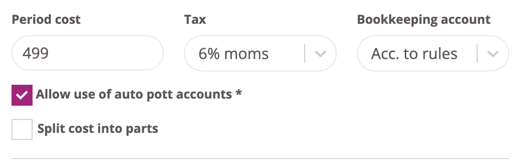
Under period cost there are also options for pott accounts and the option to split the amount. The box "Allow use of automatic pott accounts" is always checked and means that if there is money in the user's pott account when this amount is to be deducted, it will automatically be deducted from the pott (Pott accounts are Wondr's way of handling wellness contributions). The only time this box should be unchecked is if the cost does not refer to training at 6% VAT but to a good or service that has 12% or 25% VAT as these VAT rates are not approved for wellness.
The "Split cost into parts" box does not need to be used for a recurring charge so it should be left unchecked unless the amount needs to be divided between different VATs.
Binding and termination
The binding period and notice period for the subscription are stated exactly as it is. If nothing is stated here, it does not matter, but the subscription will continue until the user chooses to cancel. However, if they are to be bound for a certain period of time, this is stated in the "Binding months" box.
For example, if 12 is entered in that box, they may not cancel within 12 months. When a number is entered in that box, a new choice appears a little further down "What should happen after binding?". It is always selected by default that "Subscription continues" which means that nothing happens after the binding period ends, but the subscription continues as before, but now the user has the right to cancel it.
That the subscription simply continues is the most common choice, but there are also alternatives. That the subscription changes to another subscription (e.g. if the price is to be increased) or that it is simply terminated after the binding period.
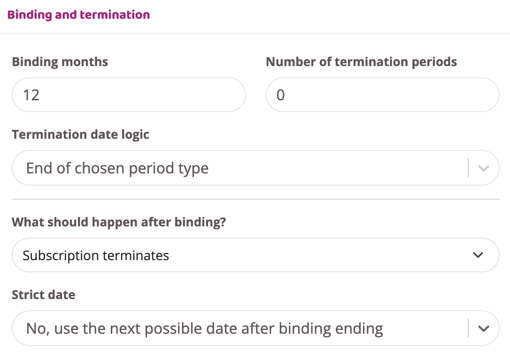
These are all the settings that need to be made for the subscription to charge continuously. Then there are many more settings that can be made on the subscription again based on your sales process.
You can read more about all these choices here: Create new subscription.
Last updated: 4/7-2025