
Table of contents:
1. Intro
2. Do this
3. How should a punch be counted?
4. Punches can be refilled
5. Related articles
Intro
To create a subscription in its entirety, read the article Create a new subscription.
This article only shows how to create a subscription with punchs and validity period. In this example, we create a subscription with 10 punches and which is valid for 6 months.
Do this
Go to Settings>Customers>Subscription Types to create a new subscriptionTo create a new subscription click "Add"
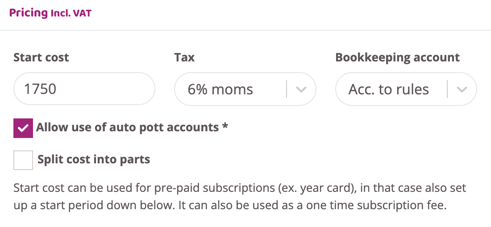
Go to the box regarding the cost of subscription "Pricing incl. VAT"
Enter the following settings
Enter the cost of the punch card. Since its a one time fee deducted upon purchase the option "Start cost" must be used.
Punch
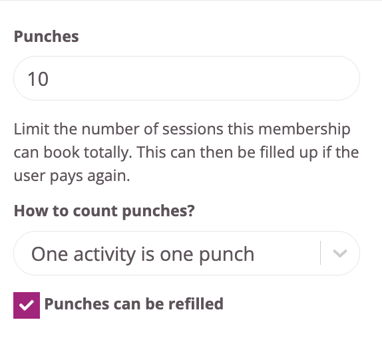
Enter the number of punches that should be included in the subscription. Two more options will then appear below the box.
How should a punch be counted?
This option only appears if you have chosen to enter the number of punches in the box above. There are three options here.
- One punch is an activity: Either one punch counts as an activity, in other words if a member is booked on two sessions on the same day, two punches will be deducted
- One punch is one day: If this option is selected, the customer will be able to book two sessions on the same day but only one punch will be drawn.
- One punch is one minute: If this option is selected, the total number of punches must be entered in minutes. For example, if the punch card is to contain 10 hours, enter 600 in the box for punches (600 min = 10 hours). When the member then books their session, the system will count the punches depending on how long the booked session is.
Punches can be refilled
This option only appears if you have chosen to enter the number of punches in the box above. Should customers be able to fill out this punch card on their own? Then check this box.
If you want to limit how long the punch card is valid, proceed to the fields related to "Date". If you do not want to have a time limit on the punch card, skip this step.
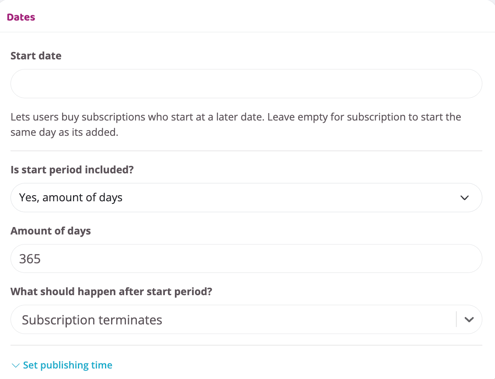
Fill in the days in the "Number of days" field (in the example 182 days = 6 months).
Then select "Subscription terminates " in the drop-down list "What should happen after the start period?".
It should look like the image below:
When you are finished with all the settings, click the "Create subscription" button.
In the example, we have created a subscription with 10 punches. The cost of the punch card is 1750 SEK and one activity is one punch. The validity period is 12 months and then the membership ends even if there are punches left. If all the punches are used within the validity period, the punch card ends when the last punch has been used.
Related articles
Last updated: 4/7-2025