
Intro
In this article, we will describe step-by-step how to create a smart rule that reminds customers X number of days before their subscription expires. In this example, we will assume that the message should be sent 7 days before the subscription expires and that the message should be sent as an email.
Do this:
Go to Settings > Smart Rules
Click the plus icon in the top right to add a new smart rule.
First step is to choose what type of event in the system will trigger the rule. In this case we will choose the option " All users, once per day "
After you select "Trigger", it's time to set up the smart rule.
Start by filling in "Name", in this example we have chosen to name the rule "Renew subscription 1 week before". Below there is a checkbox "Enable" to activate the rule, check it and the rule will take effect when you have finished creating the rule.
Under filtering, first press the "Add comparison" button
Set as below:
In the first drop-down list, select "Active subscription - Terminate date".
In the second drop-down list, select "Within days forward".
In the third drop-down list, type "7" (or another number if you want).
(In the top drop-down list where you choose between "and" or "or", leave "and" as is).
It should now look like the image below: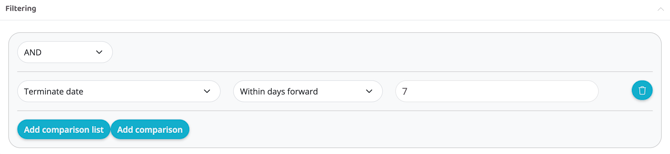
Add action
Now we come to "Actions" (what will happen).
Add a first action via the plus sign.
Select "Communicate - Email ". For this action there are a few more options, set as below:
From
The facility's email address.
To
$(User.email)
Subject
Optional! This will be the subject line of the email (For example: Your subscription is about to expire!).
Content
Here you fill in what you want to be in the email that goes out to customers.
Example:
"Hello $(User.first_name),
We just want to use this notice to let you know that your current subscription with us will expire in 7 days.
You can email us at info@xxx.se and let us know how you want to set up your upcoming subscription and we will arrange it right away!
We hope you are satisfied with us!
With warmest regards,
XXX"
Then set "Repeats".
Number of days until this rule can be run again: A number higher than the one specified in this case, e.g. 8 (so that the rule is only run once).
Subject
User
Press "Create".
If you have chosen to check the "Enabled" box, the rule is now live.