
Intro
This feature allows your users who have multiple subscriptions to choose which one they want to use when booking (provided that multiple subscriptions have access to the activity. If only one subscription has access, it will be selected automatically.
An example is if a user has a monthly subscription with a weekly limit. But they also have a punch card, in this case the user is given a choice when booking an activity. Do they want the activity to be registered on the monthly membership or should a punch be drawn?
Do this
Go to Settings > Booking to activate this feature.
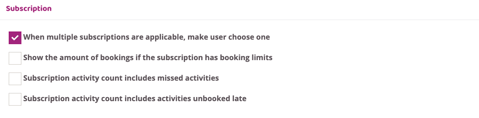
Scroll to the bottom of Booking Settings, where there is a checkbox with the text "When multiple subscriptions are applicable, make user choose one". Check that box and press save to activate the feature.
When users click "Book" in the schedule, they will now be given a choice in the "Confirm booking" box where they can choose which subscription to use. Provided that multiple of their subscriptions have access to book the activity in question.
Last updated: 12/1-2026