
Intro
Subscription categories allow you to sort your different subscriptions into categories. These categories will be visible on the website and will be located in menus so it will be easier for users to navigate between different subscriptions.
This feature is only for sorting subscriptions on the website. The same subscription can be visible in multiple categories.
Do this
-
Create a subscription category by going to Settings > Customers > Subscription Categories
-
Tap the plus icon in the top right corner to create a new category
-
Enter the relevant settings for your category, an explanation of the different settings can be found below
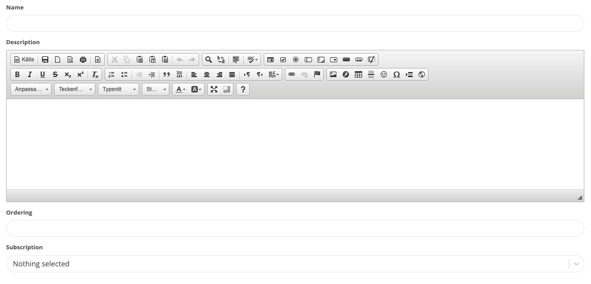
Name
Category name
Description (Optional)
Enter descriptive text for what is included in the category
Ordering
If there are multiple categories, the order in which they should be displayed is specified here
Subscription
Specify which subscriptions should be visible in the category
Then click "Create"
Example 1
In the example image below, obe subscription is shown above the other categories as these are the subscriptions we primarily want to sell. This subscription is not in any category and are therefore shown above. If you want only the categories to be visible, all subscriptions need to be placed in categories.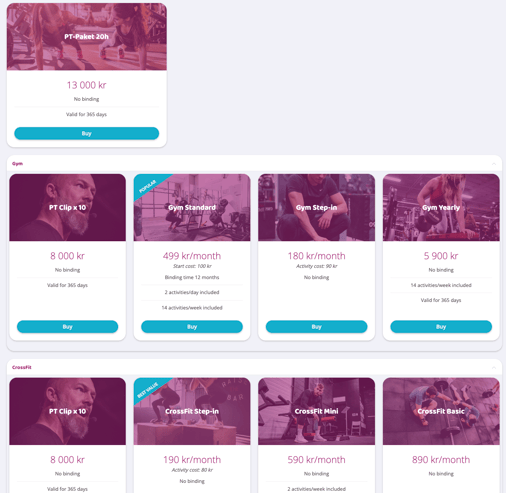
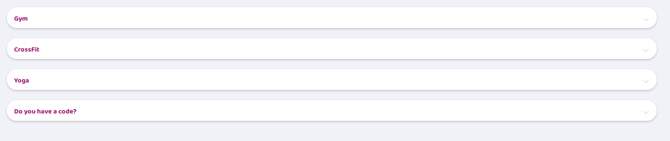
Example 2
The example image below shows what the categories look like if all subscriptions are in categories.
Last updated: 9/7-2025