
Skip to content
English
  • There are no suggestions because the search field is empty.

Private comment in the schedule

A private comment is a note in the schedule that can only be seen by staff and admins

It is possible to create a comment that is only visible to administrators and other staff in the schedule.

Go to the schedule view (either weekly schedule or list schedule) to enter a private comment for an individual session. Tap on the session the comment should apply to and the following view will become visible.

Tap the highlighted icon that shows a text document. A "Private Comment" box will appear. Type the desired comment and save.
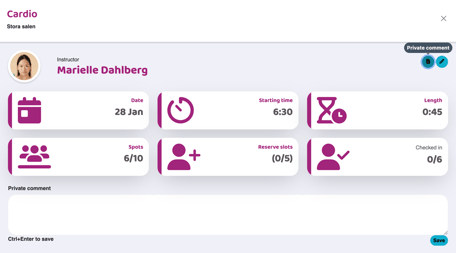
Activity details view for a cardio session in “Stora salen” showing instructor, date, start time, duration, available spots, reserve slots, and check-in status. A private comment field and save option are visible.

Once the comment is saved, the text will be available to administrators and staff (NOT customers).
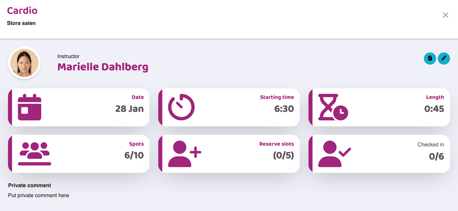
 Activity details view for a cardio session in “Stora salen” showing instructor, date, start time, duration, available spots, reserve slots, and check-in status. A private comment field is displayed below the activity details.
 

The private comment is also visible in the schedule without you having to tap on the pass and it is only visible on the pass the comment is on.
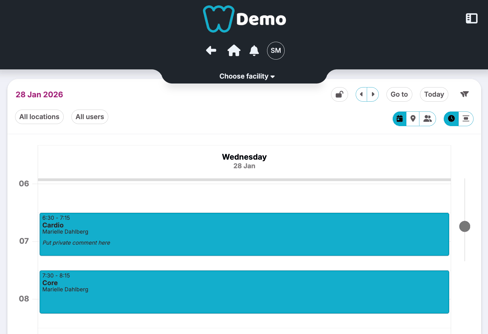
Daily schedule view for Wednesday, 28 Jan 2026, filtered by all locations and all users. Two activities are shown as time blocks: a cardio session from 06:30–07:15 and a core session from 07:30–08:15, both led by Marielle Dahlberg.


Last updated: 9/7-2025