Gå til indhold
Dansk
  • Der er ingen forslag, da søgefeltet er tomt.

Aflyse aktivitet og advisere deltagerne

Nogle gange går tingene ikke som planlagt, og en aktivitet skal aflyses. Her er en guide til, hvordan man aflyser en session og adviserer alle, der har booket

  1. For at aflyse en aktivitet skal du gå til holdplanen og klikke på aktiviteten.

  2. Klik derefter på "Rediger" (blyanten).

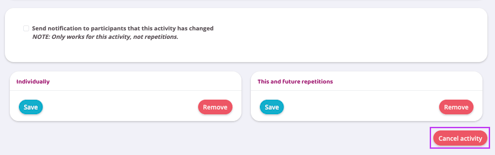
  3. Scroll lidt længere ned i billedet og tryk på knappen "Annuller aktivitet".

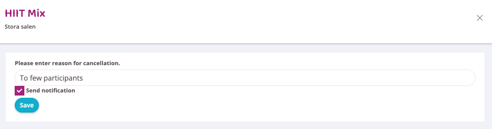
  4. Udfyld årsagen til den aflyste session, og tryk derefter på Gem-knappen. Lad boksen "Send besked til dem der har booket" være markeret, så vil alle deltagere modtage en besked om, at aktiviteten er aflyst.

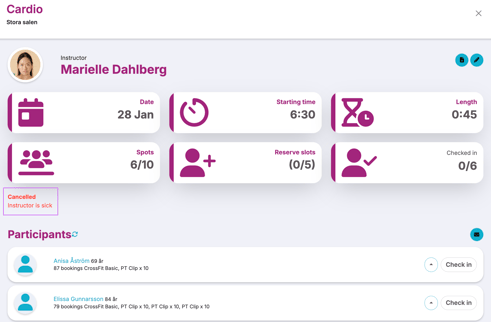
  5. Der er nu en note, der angiver, at aktiviteten er aflyst, og ingen kan booke den.
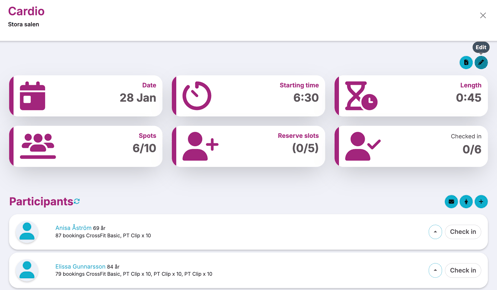
    Activity details view for a cardio session in “Stora salen” showing date, start time, duration, available spots, reserve slots, and check-in status. The participants list is visible below with individual check-in buttons.
    Activity edit actions section with an option to notify participants about changes. Buttons are shown to save or remove the activity individually or for this and future repetitions, and a highlighted Cancel activity button is displayed.
    Cancel activity dialog for a HIIT Mix session in “Stora salen.” A text field for the cancellation reason is filled in, the Send notification option is selected, and a Save button is shown.
    Activity details view for a cancelled cardio session in “Stora salen.” The session shows date, start time, duration, spots, reserve slots, and check-in status, with a cancellation notice stating “Instructor is sick” displayed below the activity details.

Sidst redigeret: 9/7-2025